Every company has data that it must keep secure — whether that data is about confidential innovations, strategic plans, or sensitive HR issues. Keeping all of this data safe from inadvertent or purposeful leaks needs to be simple, quick, and reliable. Google for Work already helps admins manage information security with tools such as encryption, sharing controls, mobile device management, and two-factor authentication. However, sometimes user actions compromise the best of all of these controls; for example, a user might hit “Reply all” when meaning to send a private message with sensitive content.
Starting today, if you’re a Google Apps Unlimited customer, Data Loss Prevention (DLP) for Gmail will add another layer of protection to prevent sensitive information from being revealed to those who shouldn’t have it.
How Gmail DLP works
Organizations may have a policy that the Sales department should not share customer credit cards externally. To keep this information safe, admins can now easily set up a DLP policy by selecting “Credit Card Numbers” from a library of predefined content detectors. Gmail DLP will automatically check all outgoing emails from the Sales department and take action based on what the admin has specified: either quarantine the email for review, tell users to modify the information, or block the email from being sent and notify the sender.
These checks don’t just apply to email text, but also to content inside common attachment types―such as documents, presentations, and spreadsheets. Admins can also create custom rules with keywords and regular expressions. So if there’s a confidential new product your company is building codenamed Lochness, admins can create custom checks for lochness, confidential, and other keywords to help deter any leaks.
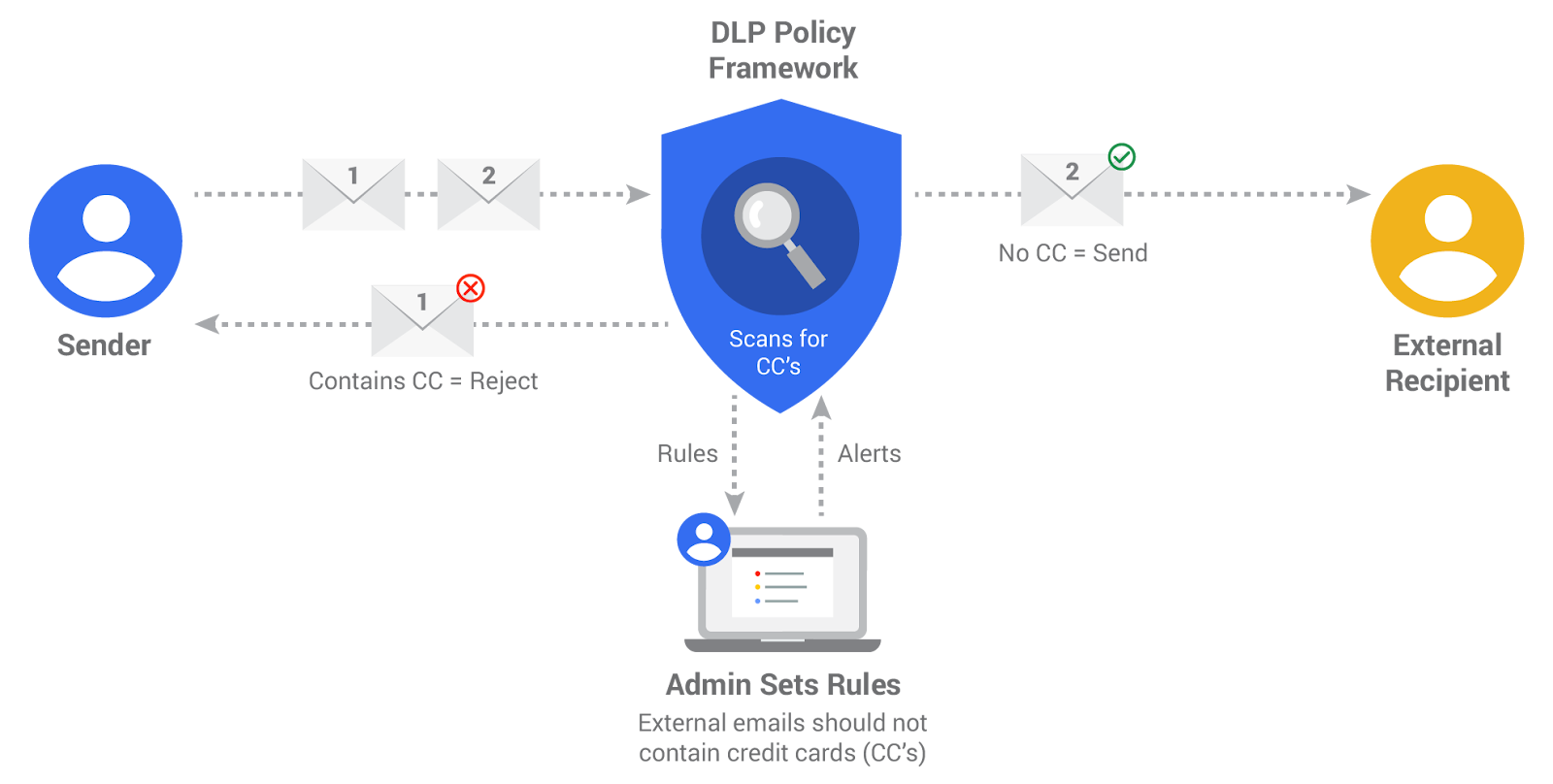
Check out the DLP whitepaper for more information, including the full list of predefined content creators, and get started. Gmail DLP is the first step in a long term investment to bring rule-based security across Google Apps. We’re working on bringing DLP to Google Drive early next year, along with other rule-based security systems.
Note: this feature is available for Google Apps for Work Unlimited customers only.
Launch Details
Release track:
Launching to both Rapid release and Scheduled release
Rollout pace:
Gradual rollout (potentially longer than 3 days for feature visibility)
Impact:
Admins only
Action:
Admin action suggested/FYI
More Information
Help Center
Note: all launches are applicable to all Google Apps editions unless otherwise noted
Launch release calendar
Launch detail categories
Get these product update alerts by email
Subscribe to the RSS feed of these updates
Starting today, if you’re a Google Apps Unlimited customer, Data Loss Prevention (DLP) for Gmail will add another layer of protection to prevent sensitive information from being revealed to those who shouldn’t have it.
How Gmail DLP works
Organizations may have a policy that the Sales department should not share customer credit cards externally. To keep this information safe, admins can now easily set up a DLP policy by selecting “Credit Card Numbers” from a library of predefined content detectors. Gmail DLP will automatically check all outgoing emails from the Sales department and take action based on what the admin has specified: either quarantine the email for review, tell users to modify the information, or block the email from being sent and notify the sender.
These checks don’t just apply to email text, but also to content inside common attachment types―such as documents, presentations, and spreadsheets. Admins can also create custom rules with keywords and regular expressions. So if there’s a confidential new product your company is building codenamed Lochness, admins can create custom checks for lochness, confidential, and other keywords to help deter any leaks.
Check out the DLP whitepaper for more information, including the full list of predefined content creators, and get started. Gmail DLP is the first step in a long term investment to bring rule-based security across Google Apps. We’re working on bringing DLP to Google Drive early next year, along with other rule-based security systems.
Note: this feature is available for Google Apps for Work Unlimited customers only.
Launch Details
Release track:
Launching to both Rapid release and Scheduled release
Rollout pace:
Gradual rollout (potentially longer than 3 days for feature visibility)
Impact:
Admins only
Action:
Admin action suggested/FYI
More Information
Help Center
Launch release calendar
Launch detail categories
Get these product update alerts by email
Subscribe to the RSS feed of these updates

0 $type={blogger}
Post a Comment
Thank you for reaching out to us. We are happy to receive your opinion and request. If you need advert or sponsored post, We’re excited you’re considering advertising or sponsoring a post on our blog. Your support is what keeps us going. With the current trend, it’s very obvious content marketing is the way to go. Banner advertising and trying to get customers through Google Adwords may get you customers but it has been proven beyond doubt that Content Marketing has more lasting benefits.
We offer majorly two types of advertising:
1. Sponsored Posts: If you are really interested in publishing a sponsored post or a press release, video content, advertorial or any other kind of sponsored post, then you are at the right place.
WHAT KIND OF SPONSORED POSTS DO WE ACCEPT?
Generally, a sponsored post can be any of the following:
Press release
Advertorial
Video content
Article
Interview
This kind of post is usually written to promote you or your business. However, we do prefer posts that naturally flow with the site’s general content. This means we can also promote artists, songs, cosmetic products and things that you love of all products or services.
DURATION & BONUSES
Every sponsored article will remain live on the site as long as this website exists. The duration is indefinite! Again, we will share your post on our social media channels and our email subscribers too will get to read your article. You’re exposing your article to our: Twitter followers, Facebook fans and other social networks.
We will also try as much as possible to optimize your post for search engines as well.
Submission of Materials : Sponsored post should be well written in English language and all materials must be delivered via electronic medium. All sponsored posts must be delivered via electronic version, either on disk or e-mail on Microsoft Word unless otherwise noted.
PRICING
The price largely depends on if you’re writing the content or we’re to do that. But if your are writing the content, it is $60 per article.
2. Banner Advertising: We also offer banner advertising in various sizes and of course, our prices are flexible. you may choose to for the weekly rate or simply buy your desired number of impressions.
Technical Details And Pricing
Banner Size 300 X 250 pixels : Appears on the home page and below all pages on the site.
Banner Size 728 X 90 pixels: Appears on the top right Corner of the homepage and all pages on the site.
Large rectangle Banner Size (336x280) : Appears on the home page and below all pages on the site.
Small square (200x200) : Appears on the right side of the home page and all pages on the site.
Half page (300x600) : Appears on the right side of the home page and all pages on the site.
Portrait (300x1050) : Appears on the right side of the home page and all pages on the site.
Billboard (970x250) : Appears on the home page.
Submission of Materials : Banner ads can be in jpeg, jpg and gif format. All materials must be deliverd via electronic medium. All ads must be delivered via electronic version, either on disk or e-mail in the ordered pixel dimensions unless otherwise noted.
For advertising offers, send an email with your name,company, website, country and advert or sponsored post you want to appear on our website to omodjk(at)gmail(dot)com
Normally, we should respond within 48 hours.