It’s almost here. The first three-day weekend after the longest stretch of the year without a paid holiday—and the unofficial start of summer. With nearly 34 million people expected to hit the roads and travel more than 50 miles this Memorial Day weekend, travelers just might need some assistance getting where they’re going, beating the crowds and exploring once there. With Google Maps as your copilot you’ll have a leg up on the road tripping competition. Here are some Google Maps features and time-saving tips to help ace your long weekend road trip:
Searching within Navigation: Make quick pit stops without long detours. Search for places along your route without ever leaving navigation mode. Once in navigation mode, just tap the magnifying glass and then tap a category like “gas stations” and see real-time gas prices or “restaurants” to see dining options close to you. Tap “search for more places” to search for a venue outside the preset categories. And no matter what you search for, you’re alerted to how much detour time the stop will add to your trip. Available on iPhone and Android
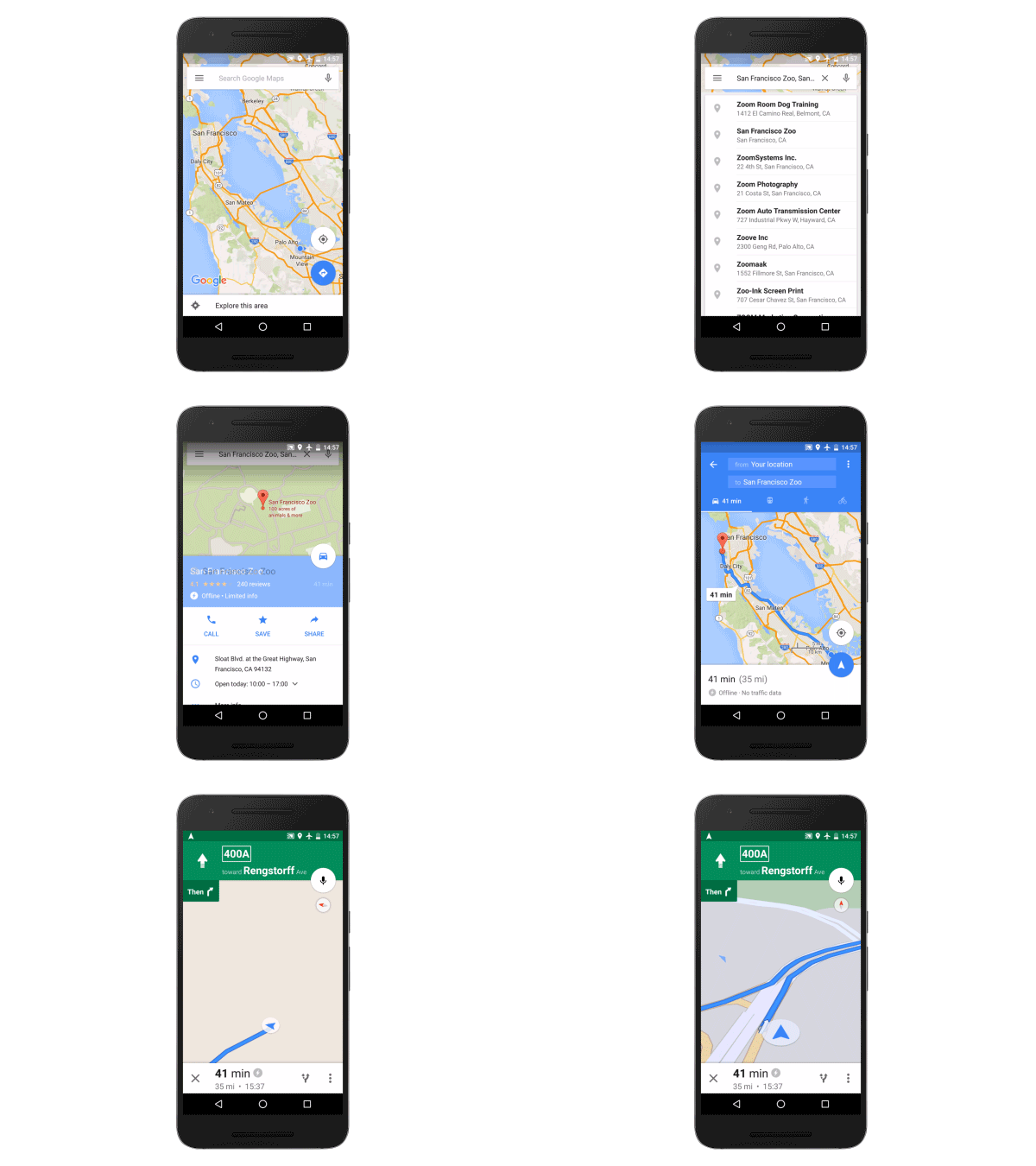
Offline Maps: Search for places, get directions, and turn-by-turn navigation even when you hit a dead zone. Before you leave and still have a wifi connection, just download the region you’ll be traveling within for an uninterrupted navigation experience once you hit the road. Available on Android and iPhone
Real-time Traffic Alerts and Dynamic Rerouting: Google Maps gives you the best and fastest route based on current and historic traffic conditions. When you Input a destination, you get alerted about upcoming traffic conditions. And while on the road, Google Maps gives you a heads up if congestion lies ahead along with an estimate of how long the delay will be. You’ll also get suggestions for an alternative route (if a faster one is available) with an explanation for why it’s recommended. Available on Android and iPhone
Toll and Ferry Notifications: Never get caught without exact change again. You’ll see a toll icon when your route includes toll roads and you’ll see a ferry icon if your route requires you to take a ferry. To avoid tolls and ferries completely, select “Route options” when you search for driving directions and check off the categories you want to avoid. Available on Android and iPhone
Explore: Once you get to your destination, open Google Maps and tap “Explore food & drinks near you” at the bottom of the screen. Based on the time of day, you’ll see relevant lists of food and drink locations nearby. Available on Android and rolling out to iPhone users in the US, UK, Japan, France, Germany, Italy and Spain now
Now that you’ve got the scoop on road trip-friendly features, get familiar with some time-saving tips. Master these simple hacks and you’ll practically be a Google Maps ninja.
Shift into navigation mode faster: You can access navigation mode in Maps (turn-by-turn directions and dictation) by tapping and holding the car, bike, or walk icon in the bottom right corner of your phone screen. Available on Android and iPhone
Get oriented with one tap: Tap the compass in the top right corner of your screen, and the map will shift to match the direction you’re facing. Available on Android and iPhone
Try the one-handed zoom: If you've only got one hand free, you can still zoom into your map—just double tap the screen and swipe up or down to zoom in and out. Available on Android and iPhone
Quickly access Street View on the go: On your phone, long press somewhere on the map to drop a pin, search for a place, or select a location already shown. Tap the bar at the bottom of the screen and then tap again on the image with the 360 degree arrow in the bottom left hand corner to enter Street View mode. To take a look around your destination just swipe around the Street View image. Available on Android and iPhone
Posted by Amanda Leicht Moore, Google Maps Product Manager
More like this
0
$type={blogger}
Post a Comment
Thank you for reaching out to us. We are happy to receive your opinion and request. If you need advert or sponsored post, We’re excited you’re considering advertising or sponsoring a post on our blog. Your support is what keeps us going. With the current trend, it’s very obvious content marketing is the way to go. Banner advertising and trying to get customers through Google Adwords may get you customers but it has been proven beyond doubt that Content Marketing has more lasting benefits. We offer majorly two types of advertising: 1. Sponsored Posts: If you are really interested in publishing a sponsored post or a press release, video content, advertorial or any other kind of sponsored post, then you are at the right place. WHAT KIND OF SPONSORED POSTS DO WE ACCEPT? Generally, a sponsored post can be any of the following: Press release Advertorial Video content Article Interview This kind of post is usually written to promote you or your business. However, we do prefer posts that naturally flow with the site’s general content. This means we can also promote artists, songs, cosmetic products and things that you love of all products or services. DURATION & BONUSES Every sponsored article will remain live on the site as long as this website exists. The duration is indefinite! Again, we will share your post on our social media channels and our email subscribers too will get to read your article. You’re exposing your article to our: Twitter followers, Facebook fans and other social networks.
We will also try as much as possible to optimize your post for search engines as well.
Submission of Materials : Sponsored post should be well written in English language and all materials must be delivered via electronic medium. All sponsored posts must be delivered via electronic version, either on disk or e-mail on Microsoft Word unless otherwise noted. PRICING The price largely depends on if you’re writing the content or we’re to do that. But if your are writing the content, it is $60 per article.
2. Banner Advertising: We also offer banner advertising in various sizes and of course, our prices are flexible. you may choose to for the weekly rate or simply buy your desired number of impressions.
Technical Details And Pricing Banner Size 300 X 250 pixels : Appears on the home page and below all pages on the site. Banner Size 728 X 90 pixels: Appears on the top right Corner of the homepage and all pages on the site. Large rectangle Banner Size (336x280) : Appears on the home page and below all pages on the site. Small square (200x200) : Appears on the right side of the home page and all pages on the site. Half page (300x600) : Appears on the right side of the home page and all pages on the site. Portrait (300x1050) : Appears on the right side of the home page and all pages on the site. Billboard (970x250) : Appears on the home page.
Submission of Materials : Banner ads can be in jpeg, jpg and gif format. All materials must be deliverd via electronic medium. All ads must be delivered via electronic version, either on disk or e-mail in the ordered pixel dimensions unless otherwise noted. For advertising offers, send an email with your name,company, website, country and advert or sponsored post you want to appear on our website to omodjk(at)gmail(dot)com


0 $type={blogger}
Post a Comment
Thank you for reaching out to us. We are happy to receive your opinion and request. If you need advert or sponsored post, We’re excited you’re considering advertising or sponsoring a post on our blog. Your support is what keeps us going. With the current trend, it’s very obvious content marketing is the way to go. Banner advertising and trying to get customers through Google Adwords may get you customers but it has been proven beyond doubt that Content Marketing has more lasting benefits.
We offer majorly two types of advertising:
1. Sponsored Posts: If you are really interested in publishing a sponsored post or a press release, video content, advertorial or any other kind of sponsored post, then you are at the right place.
WHAT KIND OF SPONSORED POSTS DO WE ACCEPT?
Generally, a sponsored post can be any of the following:
Press release
Advertorial
Video content
Article
Interview
This kind of post is usually written to promote you or your business. However, we do prefer posts that naturally flow with the site’s general content. This means we can also promote artists, songs, cosmetic products and things that you love of all products or services.
DURATION & BONUSES
Every sponsored article will remain live on the site as long as this website exists. The duration is indefinite! Again, we will share your post on our social media channels and our email subscribers too will get to read your article. You’re exposing your article to our: Twitter followers, Facebook fans and other social networks.
We will also try as much as possible to optimize your post for search engines as well.
Submission of Materials : Sponsored post should be well written in English language and all materials must be delivered via electronic medium. All sponsored posts must be delivered via electronic version, either on disk or e-mail on Microsoft Word unless otherwise noted.
PRICING
The price largely depends on if you’re writing the content or we’re to do that. But if your are writing the content, it is $60 per article.
2. Banner Advertising: We also offer banner advertising in various sizes and of course, our prices are flexible. you may choose to for the weekly rate or simply buy your desired number of impressions.
Technical Details And Pricing
Banner Size 300 X 250 pixels : Appears on the home page and below all pages on the site.
Banner Size 728 X 90 pixels: Appears on the top right Corner of the homepage and all pages on the site.
Large rectangle Banner Size (336x280) : Appears on the home page and below all pages on the site.
Small square (200x200) : Appears on the right side of the home page and all pages on the site.
Half page (300x600) : Appears on the right side of the home page and all pages on the site.
Portrait (300x1050) : Appears on the right side of the home page and all pages on the site.
Billboard (970x250) : Appears on the home page.
Submission of Materials : Banner ads can be in jpeg, jpg and gif format. All materials must be deliverd via electronic medium. All ads must be delivered via electronic version, either on disk or e-mail in the ordered pixel dimensions unless otherwise noted.
For advertising offers, send an email with your name,company, website, country and advert or sponsored post you want to appear on our website to omodjk(at)gmail(dot)com
Normally, we should respond within 48 hours.